See how your team
really uses
generative AI.
Understand your generative AI ROI, usage, and employee proficiency—all in one dashboard. Genaly gives you visibility into AI adoption across your organization.
You’ve invested in generative AI. Now what?
Is it delivering real value?
Beyond “it seems useful,” do you have the numbers to explain your return on investment?
- Q.02
Who is actually using it?
You know how many employees have access. But how many use AI in their day-to-day work?
- Q.03
Are you paying for unused licenses?
You could be paying month after month for accounts that nobody uses.
- Q.04
Who needs more support?
A few employees may be making the most of AI, while the rest of the organization isn’t seeing the same benefits.
Genaly makes the invisible measurable.
Four ways to understand AI adoption.
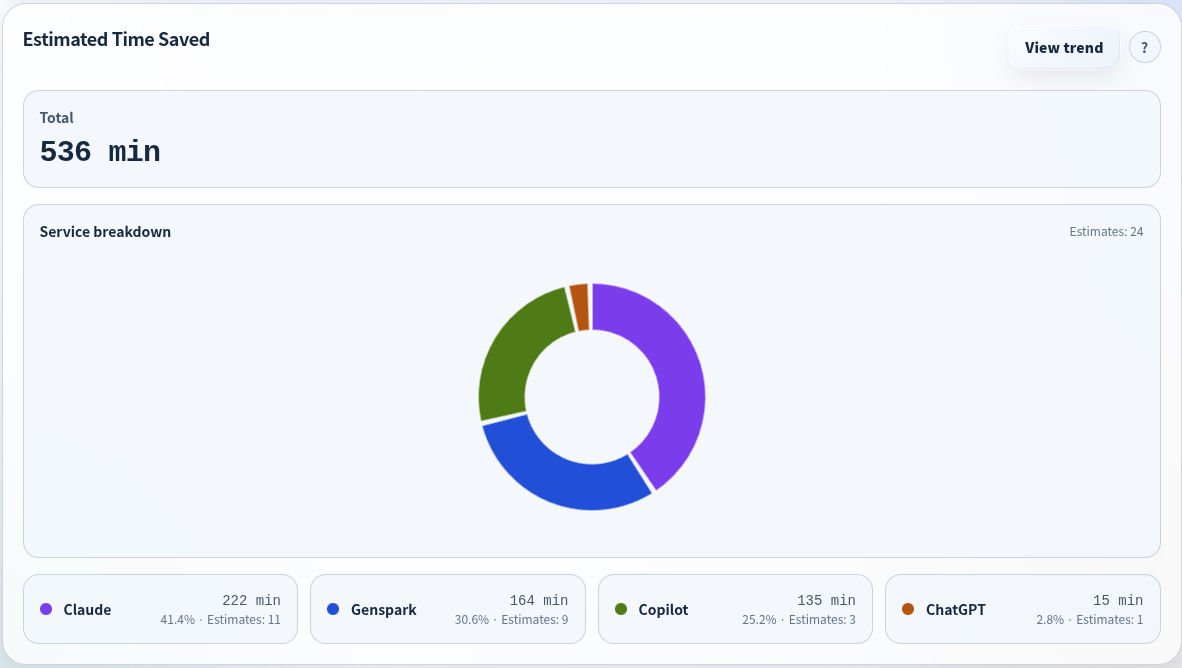
Quantify the impact
Estimate the work time saved with generative AI. Turn “it seems useful” into numbers that support your ROI assessment.
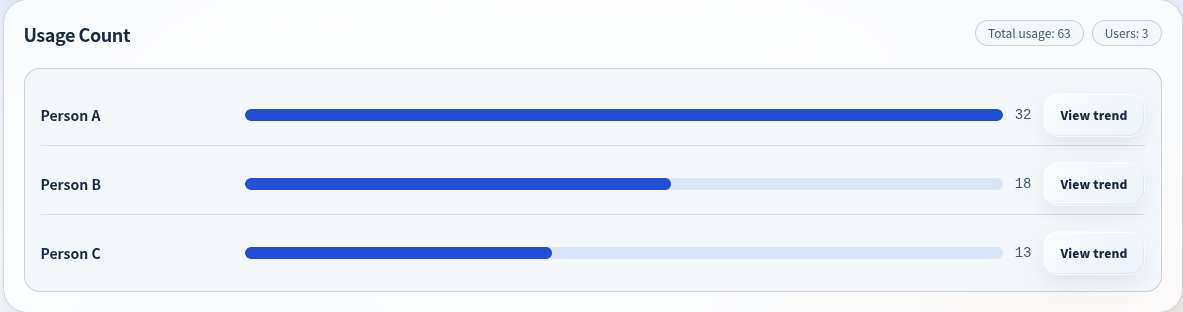
See who uses what
Identify unused accounts, detect shadow AI across supported services, and discover which tools deserve a wider rollout. Reduce unnecessary subscriptions and use the data to decide which services can deliver the most value across your organization.
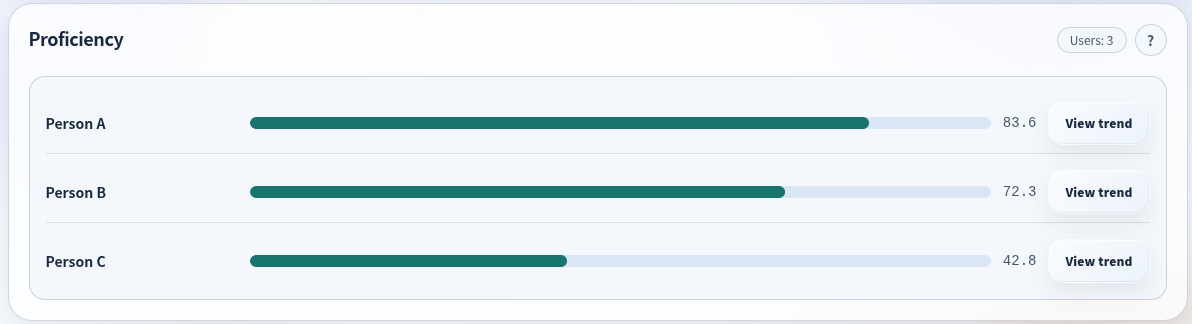
Understand AI proficiency
Use prompt-writing patterns to identify employees who may need more support. Make informed training decisions and help your whole organization build its AI skills.
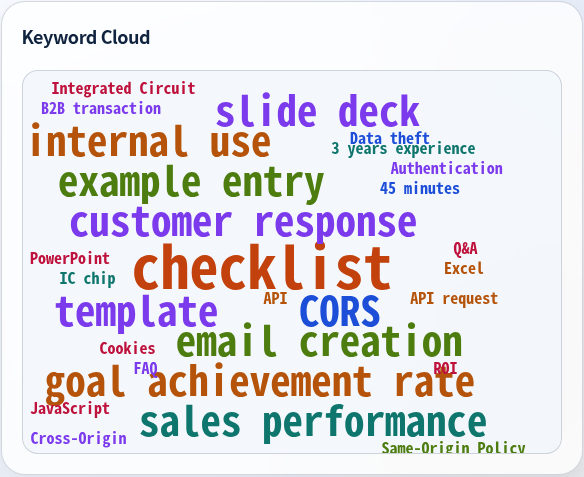
Discover how AI is being used
See what employees use generative AI for through a word cloud of work-related keywords. Understand common use cases and how often they appear.
See the value behind your AI usage.
Make the case with numbers. Explore these views from the analytics dashboard.
(about 9 hours; see the breakdown by service)
An example of the time savings Genaly estimates.
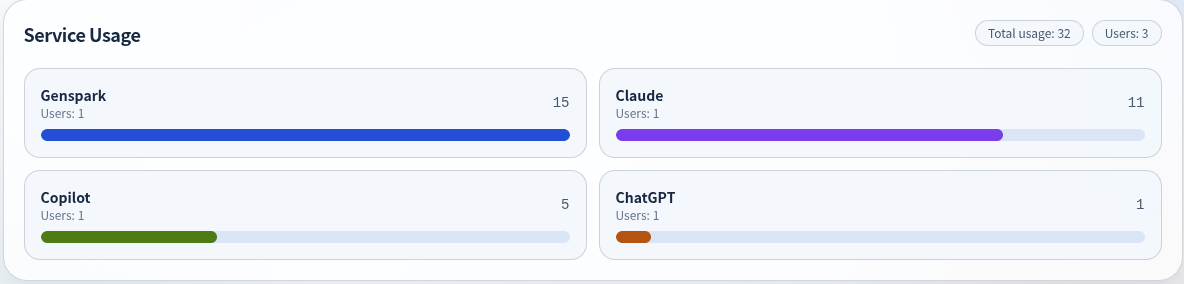
Service usage and employee proficiency, at a glance.
Get started in three steps.
Install the browser extension
Add the Chrome extension or Microsoft Edge add-on to each employee’s browser. No special configuration is required.
Sign in and use AI as usual
Sign in with your assigned user ID, then use ChatGPT, Gemini, or other supported services as you normally would. Usage data is recorded automatically.
See your insights in Genaly
Genaly automatically aggregates and analyzes usage data. Administrators can view estimated time saved, usage, and employee proficiency in the dashboard.
Minimal effort for employees. No changes to their everyday workflow.
Analytics levels and pricing
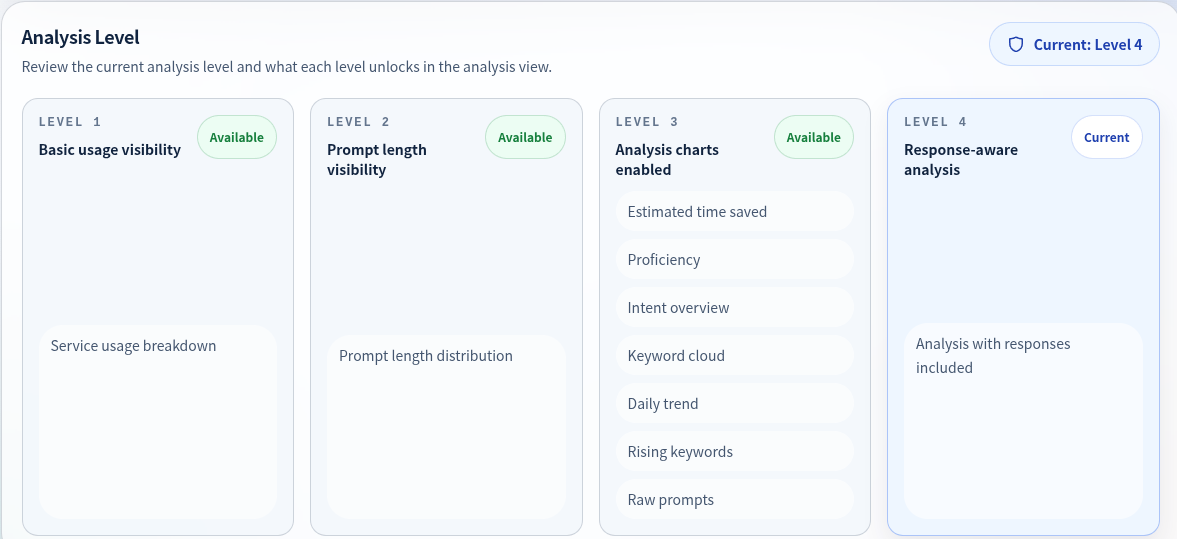
Choose the data you want to collect. Your analytics level determines the available insights and the price, so you can choose just the level you need.
Start with Level 1 and move up as your needs grow. For deeper analysis of prompt content, choose Level 3 or above.
| Feature | Level 1 | Level 2 | Level 3 | Level 4 |
|---|---|---|---|---|
| Data collected | AI usage activity | + Prompt character count | + Full prompt text | + Full response text |
| Available analytics | Usage counts | + Character count distribution | All 9 metrics | All 9 metrics (higher accuracy) |
| Per user / month | JPY 100 | JPY 100 | JPY 500 | JPY 500 |
Limited-time launch pricing.
An option is available to avoid storing prompt and response text.
Works with leading generative AI services.
Support for additional services is planned.
Frequently asked questions
Q.01What is Genaly?+
Genaly is a service that gives organizations visibility into generative AI usage and helps measure their return on investment (ROI).
Q.02Does Genaly collect employee prompts?+
It depends on the analytics level. Levels 1 and 2 do not collect prompt text. Levels 3 and 4 collect prompts to measure the impact of AI usage.
Q.03Can we choose what data is collected?+
Yes. You choose an analytics level when you sign up, and you can change it as needed.
Q.04Can we prevent prompts from being stored?+
Yes. An option is available to process collected prompts solely to measure impact, without retaining them permanently. This may reduce measurement accuracy.
Q.05Does Genaly collect activity or input outside generative AI services?+
No. Genaly only collects data needed for analysis on supported generative AI websites, such as service names, context IDs, prompt text, response text, and usage timestamps. It does not collect browsing history, input, or activity on other websites. See the supported services.
Q.06Does Genaly collect data from employees’ personal smartphones?+
No. Genaly only collects data from supported generative AI services through the Chrome extension or Microsoft Edge add-on installed on work computers. It does not collect activity on other websites or any data from smartphones.
Q.07How do we get started with Genaly?+
An administrator creates user accounts. Employees then install the Chrome extension or Microsoft Edge add-on and sign in to start using Genaly, without changing their existing workflows. Each user account requires an email address, and accounts can be created in bulk.
Q.08What is shadow AI?+
Shadow AI is the use of generative AI services at work without the organization’s approval or oversight. Genaly makes AI usage across your organization visible, including unauthorized use of supported services, helping you assess which tools to roll out company-wide.
Q.09How much does Genaly cost?+
Pricing starts at JPY 100 per user per month and varies by analytics level. See Analytics levels and pricing for details.
Ready to see how your team uses AI?
Contact us to discuss deployment, request a quote, or find the right analytics level for your organization. We’ll help you get started.
Contact us →